svgapp vs Adobe Character Animator
Compare mascot creation, pose generation, live character animation, and production complexity.

Quick Answer
Core idea: svgapp is for creating reusable mascot assets; Adobe Character Animator is for puppeteered performance and video workflows.
- Use svgapp for product mascots, SVG poses, and fast asset libraries.
- Use Character Animator for live or recorded character performances.
- Most app teams need reusable poses before they need puppeteering.
What svgapp is built for
svgapp is focused on creating mascot assets that fit websites, app screens, docs, and marketing content. The deliverable is a consistent character system with multiple poses and clean export options.
This is the common need for software teams: many small communication moments, not one long performance.
If you want to learn more about svgapp vs Adobe Character Animator, read AI Mascot Generator vs Hiring an Animator next. How to Animate a Mascot Without Losing Brand Consistency is also useful when you are mapping the same mascot system across product and marketing.
What Character Animator is built for
Adobe Character Animator is built around live or recorded character performance. It shines when a character needs to talk, react, and move like a puppet in video content. That is a different production path with different setup requirements.
It can be powerful, but it is more than most teams need for onboarding illustrations or static product states.
If you want to learn more about applying this idea in a real product workflow, Brand Mascot Guide: How to Design a Character People Actually Associate With Your Product is a practical next step.
Choose by output
If your output is SVG assets for product and web, choose svgapp. If your output is a host character, explainer video, or performance-driven content, use a dedicated animation workflow. If you plan to do both, build the mascot system first so every later animation has a consistent source.
The better the character rules, the easier the animation decisions become.
Implementation Checklist
Use this checklist before publishing the mascot assets. It keeps the character useful across the product instead of turning it into a one-page illustration.
- Choose svgapp for static product and marketing mascot assets.
- Choose Character Animator for puppeteered video content.
- Create a mascot bible before complex character production.
- Avoid overbuilding animation before validating the mascot direction.
How to Think About svgapp Versus Adobe Character Animator
This longer-form guide is for teams choosing between generated mascot pose systems and performance-driven character animation. The goal is to pick the workflow that matches whether you need reusable assets or live/recorded character performance. These tools solve different problems. svgapp is useful when teams need consistent SVG mascot assets across product and marketing. Adobe Character Animator is useful when the character needs rigged performance, facial tracking, or recorded motion.
The practical question is not whether the mascot is cute. The practical question is whether it helps people understand, remember, or complete something that matters. A strong mascot system should make the next asset easier to create, not harder.
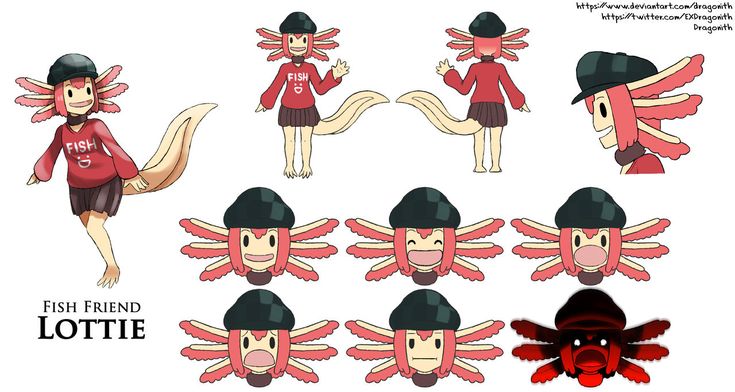
Character sheet reference on Pinterest. A character sheet is the bridge between static mascot systems and rigged animation workflows.
Build the System Before You Polish the Moment
Choose svgapp for pose libraries
If the work is landing pages, empty states, onboarding, docs, social graphics, and transparent SVG assets, a generated mascot system is usually faster and easier to maintain.
Choose Character Animator for performance
If the character must talk, react live, follow facial tracking, or star in repeated video segments, rigging and performance tools make sense. They give motion control that static pose generation is not designed to replace.
Use both when the mascot grows
A team can start with svgapp to define the character and core poses, then hand a stable character sheet to an animator or rigging workflow later.
What to Notice in the Pinterest Reference
Use Pinterest as a research board, not as a source to copy. The goal is to notice the design decisions that make a character usable across contexts, then translate those decisions into your own brand system.
- Look for front, side, and expression consistency.
- Ask whether the character is ready to be rigged.
- Notice how static reference sheets support later animation.
Common Mistakes to Avoid
- Using a rigging tool when the team only needs static product assets.
- Expecting generated SVG poses to replace performance animation.
- Starting animation before the mascot identity is stable.
Production Checklist
- Write the needed outputs before comparing tools.
- Create a character sheet before rigging.
- Use svgapp for broad pose coverage.
- Use performance tools when timing and speech matter.
How to Measure Whether It Worked
Treat the mascot like a product asset. Once it ships, review whether it improves clarity, recognition, speed, or reuse. The most useful metrics for this article are:
- Number of static assets required
- Need for live or recorded performance
- Time to create a new product pose
- Animation quality requirements
Create the character assets before the performance
Use svgapp to generate a consistent mascot foundation for product pages, campaigns, and future animation work.
Create Your Mascot