svgapp vs a DIY AI Mascot Workflow
Compare a purpose-built mascot workflow with stitching together generic image generators, vectorizers, background removers, and design tools.

Quick Answer
Core idea: A DIY AI workflow can work for experiments, but svgapp reduces the friction of consistency, SVG readiness, and pose generation.
- DIY workflows are flexible but often create inconsistent output.
- svgapp is focused on mascot systems, not generic image generation.
- The hidden cost of DIY is cleanup, vector conversion, and style drift.
The DIY stack
A typical DIY workflow involves a general image model, prompt experiments, background removal, vector conversion, manual cleanup, resizing, and maybe another tool for variations. This can be fun and flexible, especially for exploration.
The problem appears when the team needs production assets. Each extra tool adds a chance for color shifts, artifacts, mismatched proportions, or lost transparency.
If you want to learn more about svgapp vs DIY AI workflow, read AI Mascot Generator Workflow for Brand Characters next. Transparent SVG Mascots: File Formats, Exports, and Clean Product Placement is also useful when you are mapping the same mascot system across product and marketing.
Why focused workflows are faster
svgapp narrows the problem: create mascots and consistent mascot poses for apps. That focus matters because the output needs to fit product layouts, not just look good in a gallery. The workflow encourages reusable characters, transparent assets, and SVG-friendly styling.
For SEO pages, landing pages, product UI, and launch graphics, consistency usually beats unlimited prompt freedom.
If you want to learn more about applying this idea in a real product workflow, Best AI Mascot Generators for App and SaaS Teams is a practical next step.
When DIY still makes sense
Use DIY tools when you are exploring wild art directions, testing abstract inspiration, or creating non-product visuals. Move to a focused workflow when you know the mascot needs to appear across many screens and campaigns.
The practical dividing line is repetition. The more often the character appears, the more costly inconsistency becomes.
Implementation Checklist
Use this checklist before publishing the mascot assets. It keeps the character useful across the product instead of turning it into a one-page illustration.
- Use DIY for early exploration and unusual style experiments.
- Use svgapp when consistency and production placement matter.
- Watch for hidden cleanup time in vectorization and background removal.
- Choose the workflow that matches how often the mascot will be reused.
How to Think About svgapp Versus DIY AI Workflows
This longer-form guide is for builders deciding whether to assemble their own image-generation stack for mascots. The goal is to compare convenience, consistency, export quality, and maintenance cost. DIY workflows can be powerful, but they move responsibility to the team. You must manage prompts, references, file cleanup, background removal, style drift, and repeatability.
The practical question is not whether the mascot is cute. The practical question is whether it helps people understand, remember, or complete something that matters. A strong mascot system should make the next asset easier to create, not harder.
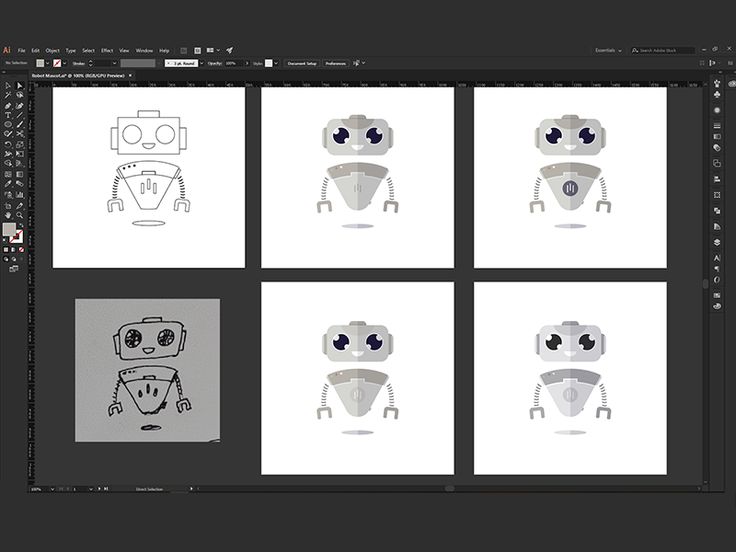
Robot Mascot Process for SaaS Platform on Pinterest. The process view is a useful reminder that mascot quality depends on repeatable workflow, not only model output.
Build the System Before You Polish the Moment
DIY gives control at the cost of upkeep
A custom workflow can combine references, image models, vector tools, upscalers, and background removal. That can be worthwhile for teams with design operations, but it becomes overhead for teams that mainly need consistent assets quickly.
A productized workflow reduces hidden steps
svgapp focuses the process around reusable mascot systems: style presets, transparent outputs, pose generation, and asset reuse. The value is less prompt plumbing and more production-ready consistency.
Compare the second asset, not the first
Many DIY workflows can make one impressive image. The real test is whether the tenth pose still matches the first and whether the team can regenerate a specific product state later.
What to Notice in the Pinterest Reference
Use Pinterest as a research board, not as a source to copy. The goal is to notice the design decisions that make a character usable across contexts, then translate those decisions into your own brand system.
- Look for visible iteration, not just the final mascot.
- Ask which steps your team would need to reproduce.
- Notice where style drift could enter the workflow.
Common Mistakes to Avoid
- Underestimating the time spent cleaning and organizing outputs.
- Using base64 or local URLs in production image flows.
- Forgetting that a mascot needs future matching poses.
Production Checklist
- Track every tool needed from prompt to export.
- Run a ten-pose consistency test.
- Calculate cleanup and file management time.
- Choose DIY only when the extra control is worth maintaining.
How to Measure Whether It Worked
Treat the mascot like a product asset. Once it ships, review whether it improves clarity, recognition, speed, or reuse. The most useful metrics for this article are:
- Tools required per asset
- Style drift across pose generations
- Cleanup time per export
- Ease of regenerating a previous character
Skip the fragile mascot toolchain
Generate consistent SVG mascot poses in one focused workflow instead of stitching together generic AI tools.
Create Your Mascot