Best AI Mascot Generators for App and SaaS Teams
How to evaluate AI mascot generators by consistency, SVG quality, pose variety, transparency, and product-readiness.

Quick Answer
Core idea: The best AI mascot generator for software teams is the one that creates consistent, reusable, product-ready character assets.
- Do not judge tools by the prettiest first image alone.
- Evaluate consistency, export quality, pose range, and workflow speed.
- For apps, SVG-friendly output and transparent backgrounds matter more than painterly detail.
Evaluation criteria
Look for five things: character consistency, pose variety, SVG readiness, transparent exports, and practical control over style. A tool that creates one beautiful mascot but cannot repeat it in ten poses will cause problems later.
Also evaluate how quickly you can move from idea to placed asset. The real deliverable is not a gallery image. It is a mascot that works in the product.
If you want to learn more about best AI mascot generators, read AI Mascot Generator Workflow for Brand Characters next. svgapp vs a DIY AI Mascot Workflow is also useful when you are mapping the same mascot system across product and marketing.
Why product-readiness matters
Many AI images look impressive at large size but become too complex for UI. Product mascots need simple forms, readable expressions, and clean edges. They need to survive small cards, mobile screens, dark mode, and marketing templates.
SVG-friendly generation is valuable because it keeps the mascot usable beyond one campaign.
If you want to learn more about applying this idea in a real product workflow, How to Create a Mascot for Your App is a practical next step.
How svgapp fits
svgapp is designed for mascot systems rather than generic image generation. That means the workflow centers on consistent characters, reusable poses, and assets that belong in apps, websites, and brand pages.
If your goal is a production mascot library, evaluate tools by how they handle the second, third, and twentieth pose.
Implementation Checklist
Use this checklist before publishing the mascot assets. It keeps the character useful across the product instead of turning it into a one-page illustration.
- Test each tool with the same mascot brief.
- Generate at least five poses before deciding.
- Check output on real UI backgrounds.
- Review export formats and cleanup requirements.
How to Think About AI Mascot Generator Evaluation
This longer-form guide is for teams comparing mascot tools before committing their visual identity to one workflow. The goal is to choose a generator based on consistency, export quality, editing control, and production fit. The best generator is not the one that makes the cutest first image. It is the one that can keep a character consistent across the second, fifth, and twentieth asset while giving your team usable files.
The practical question is not whether the mascot is cute. The practical question is whether it helps people understand, remember, or complete something that matters. A strong mascot system should make the next asset easier to create, not harder.
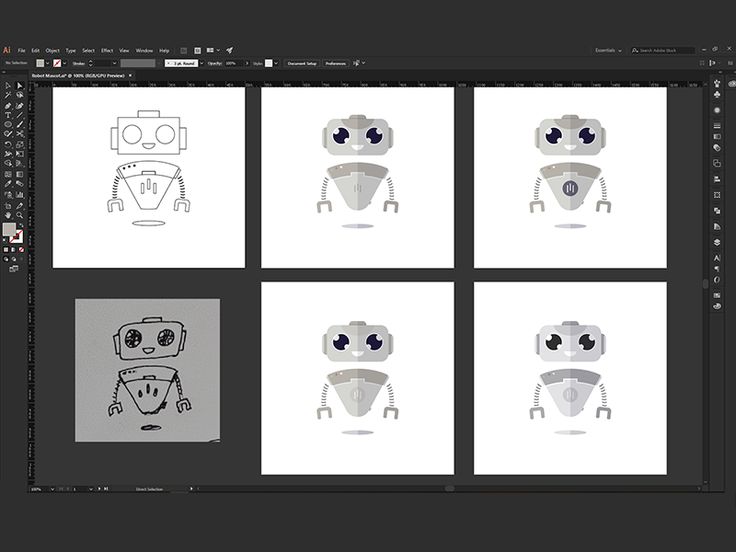
Robot Mascot Process for SaaS Platform on Pinterest. The process view is a useful reminder to judge tools by repeatability, not only by final-image charm.
Build the System Before You Polish the Moment
Test consistency before style
Generate the same character in welcome, explain, error, success, and social poses. A weak generator will drift in proportions, facial details, color, and rendering style. A strong one will preserve identity while changing the action.
Check exports and ownership workflow
For product and marketing use, transparent SVG or clean transparent PNG assets matter. Teams also need predictable naming, easy downloads, and a way to regenerate a pose later without rebuilding the character from scratch.
Evaluate how the tool handles brand constraints
A useful mascot generator should accept brand colors, audience tone, reference images, and style preferences. The output should feel like part of a system, not an isolated prompt result.
What to Notice in the Pinterest Reference
Use Pinterest as a research board, not as a source to copy. The goal is to notice the design decisions that make a character usable across contexts, then translate those decisions into your own brand system.
- Look for repeated construction decisions across several versions.
- Notice whether the character can support a professional SaaS tone.
- Use process boards as inspiration for your own generator test matrix.
Common Mistakes to Avoid
- Choosing a tool after one successful hero image.
- Ignoring file format until the assets need to ship in production.
- Treating prompt quality as a substitute for a saved character system.
Production Checklist
- Run a five-pose consistency test.
- Export transparent assets and inspect them on light and dark backgrounds.
- Document prompt, palette, and reference settings.
- Test a future-use case before publishing the first mascot.
How to Measure Whether It Worked
Treat the mascot like a product asset. Once it ships, review whether it improves clarity, recognition, speed, or reuse. The most useful metrics for this article are:
- Pose consistency across generations
- Time to production-ready export
- Number of manual edits required
- Ability to regenerate matching assets later
Try a mascot generator built for product teams
Use svgapp to create consistent SVG mascot assets for websites, apps, social posts, and launch campaigns.
Create Your Mascot